 |
AKOS
v1.0.0
Documentation
|
|
AKOS
v1.0.0
Documentation
|
In embedded systems, there are often two types of timers:
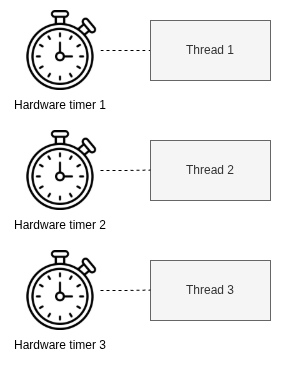
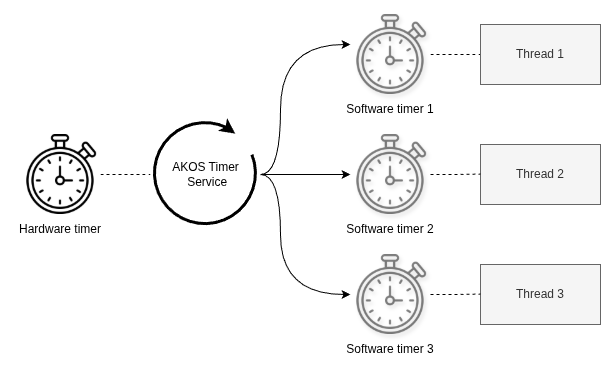
AKOS implements Software timers, AKOS timer is kernel service built on top of a hardware timer, this case is SysTick. Many other RTOSes also allow configure timer with other hardware timers.
The SysTick timer generates a periodic interrupt, called the SysTick handler. AKOS timer uses this tick to update its internal time, wake delayed tasks, and check whether any software timers have expired.
AKOS timer does not require one hardware timer per timer object. Instead, it manages many software timers in software using its timer list or timer queue.
Unlike delay, which blocks the current task, a software timer lets the task continue running. When the timer expires, AKOS can call a callback, send an event, or wake another task.
RTOS timer services are commonly used for timeout handling, periodic jobs, button debounce, protocol retry, and software watchdog logic.
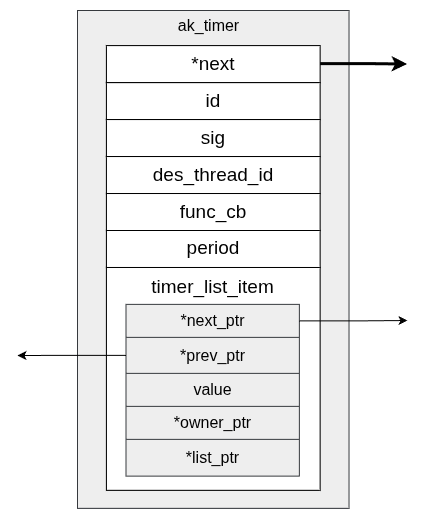
AKOS stores each software timer in a small runtime object called ak_timer_t. This object is kept inside a fixed timer pool, so timers can be created and removed without relying on general-purpose heap allocation.
The timer structure contains:
In other words, the timer object holds both the scheduling metadata and the action to perform on expiry. The list item lets AKOS sort timers by expiration tick, while the signal, callback, and period fields describe what happens when the timer fires.
AKOS uses a fixed timer pool to store all software timer objects. In the code, the pool is a static array of ak_timer, and the objects are linked together through the next pointer to form a free list.
When the timer module starts, AKOS initializes that free list and points free_list_timer_pool at the first unused timer object. Creating a timer takes one item from the free list, and removing a timer returns it back to the pool. This keeps timer allocation fast and predictable, without using the general heap.
The pool is protected by critical sections, so timer creation and removal stay safe even when the scheduler is running.
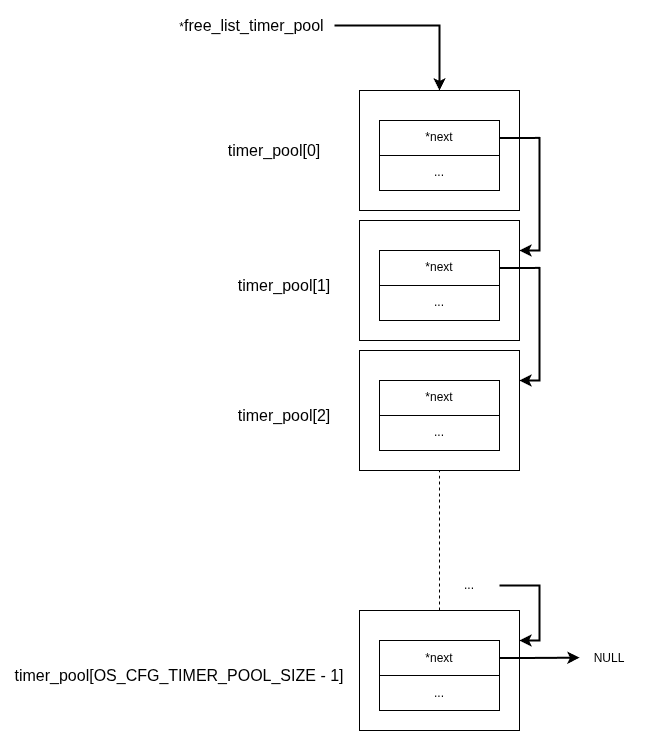
That way we have a pool of timer elements! Now everytime application need timer, it will request from this pool. Also the same when application doesnt need timer anymore, it put timer back to that pool.
Software timers also have a time property, usually called an expiration tick. This is the tick value when the timer should expire. To support this behavior, AKOS stores each software timer with an expiration tick value. This value is compared with the global tick_count, which is updated periodically by the system tick interrupt.
Because tick_count has a limited range, it can eventually overflow. For example, if tick_count is an unsigned int on a 32-bit MCU, its maximum value is 0xFFFFFFFF, or 4,294,967,295. After reaching that value, the next tick wraps it back to 0. To handle this correctly, AKOS maintains two software timer lists:
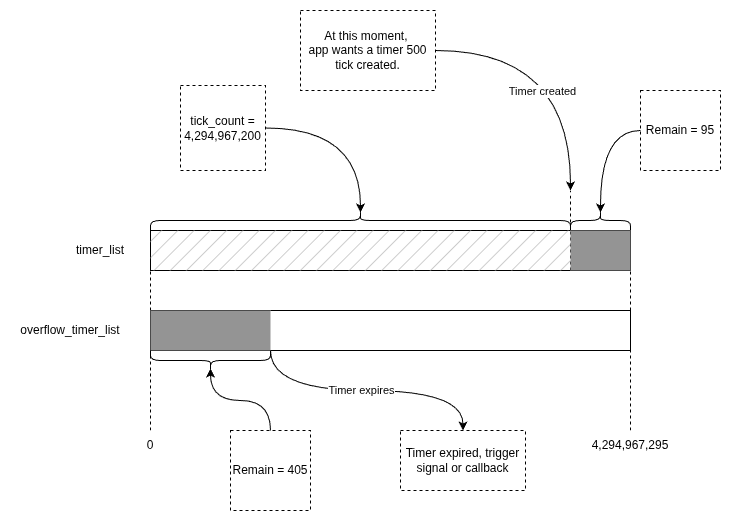
The figure above demonstrates how these lists handle the overflow timeline:
The timer-list structure is similar to the delay-list structure, but its nodes represent software timers instead of delayed threads. Each node is sorted by expiration time. With this design, AKOS only needs to check the closest timer expiration on each tick, instead of traversing the entire timer list every time.
The timer list works same like delay_list. All nodes is sorted by timestamp (timer's period + current tick). With that design, AKOS only needs to track the closest tick at which a timer's tick expires, without traversing the entire timer list.
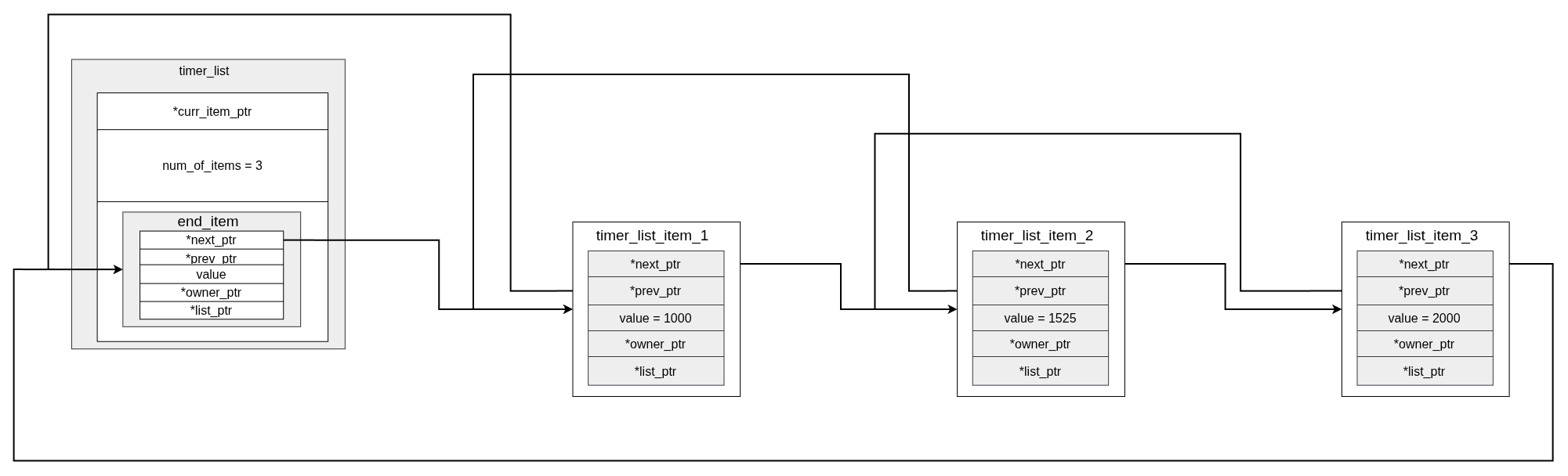
AKOS supports two software timer modes:
Both timer types can either post a signal to a destination thread or call an optional callback function when they expire. The difference is that a periodic timer stays active across multiple expirations, while a one-shot timer is used for a single timeout event.
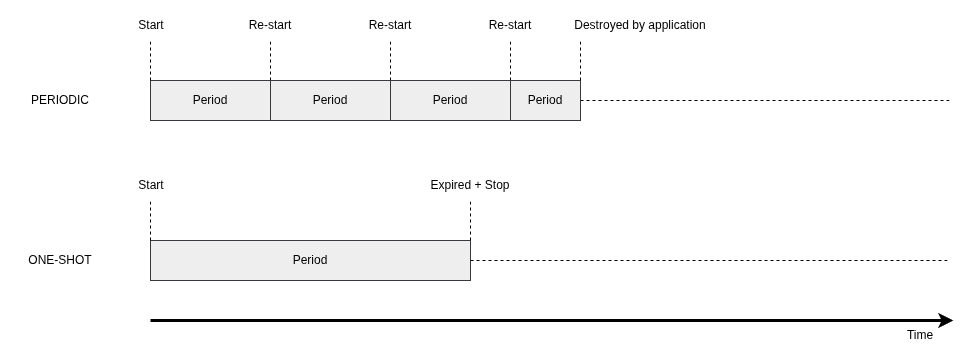
The timer service is the runtime part of the software timer subsystem. In AKOS, it is handled by the timer thread through akos_timer_processing().
On each pass, the timer service:
This design keeps timer handling centralized and predictable. The service only needs to check the timer at the head of the sorted list, so it avoids scanning every timer on every tick.
Because that timer service also is a thread, it also has priority and can be configured by OS_CFG_TIMER_TASK_PRI. Normally highest at 0. But a good rule of thumb:
 1.14.0