 |
AKOS
v1.0.0
Documentation
|
|
AKOS
v1.0.0
Documentation
|
Porting is the work needed to make AKOS run on a specific CPU architecture and board. The kernel provides the scheduling and runtime logic, while the port layer supplies the low-level CPU and startup support that the kernel depends on.
An interrupt is a hardware mechanism that signals the CPU to stop normal code temporarily and run the special function associated with that interrupt. That function is called an interrupt handler or Interrupt Service Routine (ISR). This process is usually asynchronous, except for a few special exceptions.
Interrupts also have priorities. A higher-priority ISR can preempt a lower-priority ISR to improve responsiveness.
Interrupt entry is defined as the time between interrupt reception and the start of the ISR.
Interrupt return is defined as the time between the end of the ISR and the return to the interrupted code.
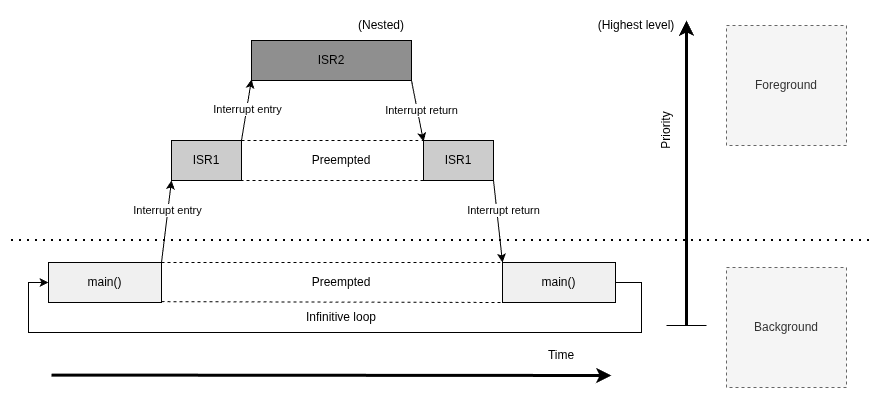
To support multiple interrupts and nesting, some processors provide extra hardware. On Cortex-M, that hardware is called the Nested Vectored Interrupt Controller (NVIC).
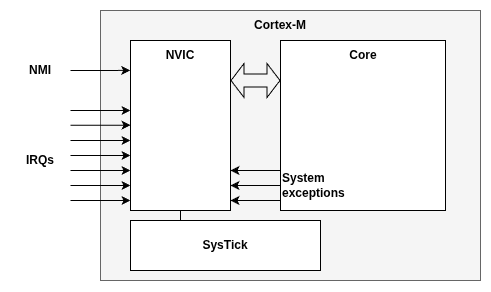
The NVIC receives interrupt signals from both outside the processor, such as I/O and peripherals, and from inside the CPU, such as divide-by-zero faults.
The AKOS Cortex-M family relies on a few core CPU features:
Cortex-M has two execution modes:
Handler mode is always privileged. AKOS uses it for kernel work such as SVC startup and PendSV context switching.
Thread mode can be either privileged or unprivileged. Privileged thread mode can access system control features, while unprivileged thread mode is restricted from touching protected resources directly.
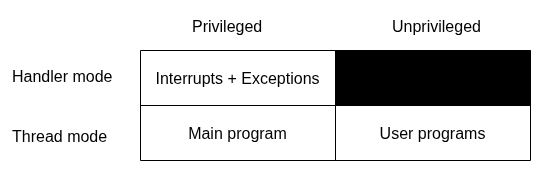
Reset_Handler is the special entry point that starts execution in privileged Thread mode on ARM Cortex-M processors. While most hardware exceptions, such as interrupts or faults, force the processor into Handler mode, reset is different: it brings the processor directly into privileged Thread mode so the startup code can initialize the system before branching into the main application.
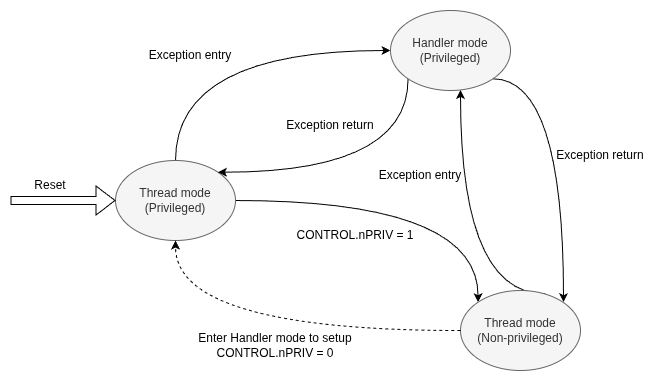
As we dive into the code, we can see that Reset_Handler calls main(). That is interesting because main() does not run in Handler mode. Instead, Reset_Handler starts execution in privileged Thread mode before handing control to the application.
Thread mode starts in privileged state. If software sets CONTROL.nPRIV = 1, Thread mode becomes unprivileged.
Handler mode can be entered from Thread mode through exception entry, and it always runs in privileged state. Exception return takes the CPU back to Thread mode.
Unprivileged Thread mode has restrictions on instructions and memory access. To return to privileged Thread mode, privileged code must clear CONTROL.nPRIV back to 0, usually through help from an exception or kernel service.
Some RTOSes place application threads in unprivileged mode to improve isolation. AKOS does not set CONTROL.nPRIV, so all threads in AKOS run in privileged mode.
The terms interrupt and exception are often used interchangeably. In ARM Cortex-M, exception is the more general term. An interrupt is one type of exception, usually generated by a peripheral or external hardware event.
Exceptions are identified by the following information:
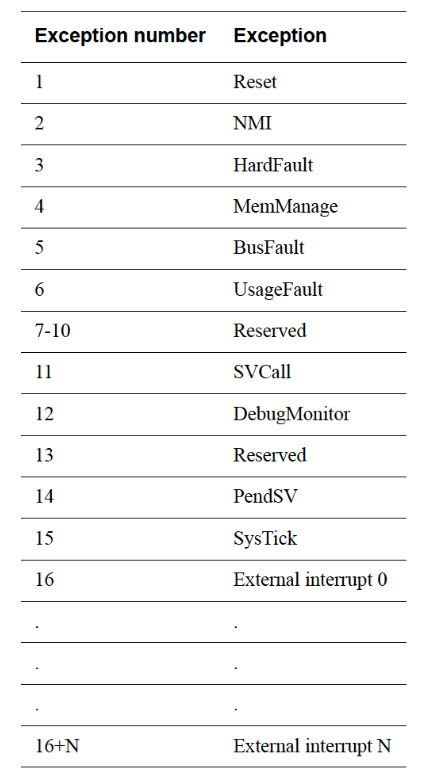
An exception can be in one of several states:
Special exceptions with fixed priority and synchronous behavior include:
All other configurable exceptions and external interrupts can have their priority numbers set by software. The default is 0.
The AKOS Cortex-M3 port sets these priorities:
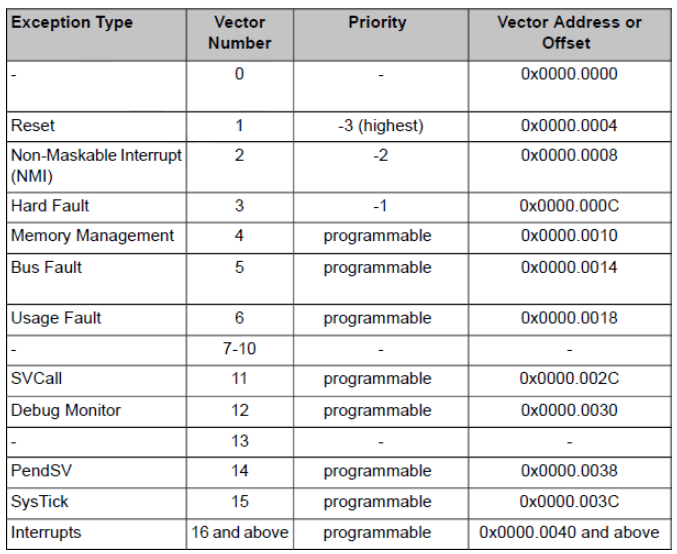
SysTick is the periodic timer that generates the AKOS tick interrupt. In this port, akos_port_systick_init_freq() configures it for a 1 ms tick, and the SysTick handler updates kernel time and checks whether a context switch is needed.
Because it is a system timer, SysTick is kept at a low priority so it can run without blocking more urgent work. It still stays above PendSV, so deferred context switching remains the lowest-priority exception.
Let's take a look at SysTick's architecture.
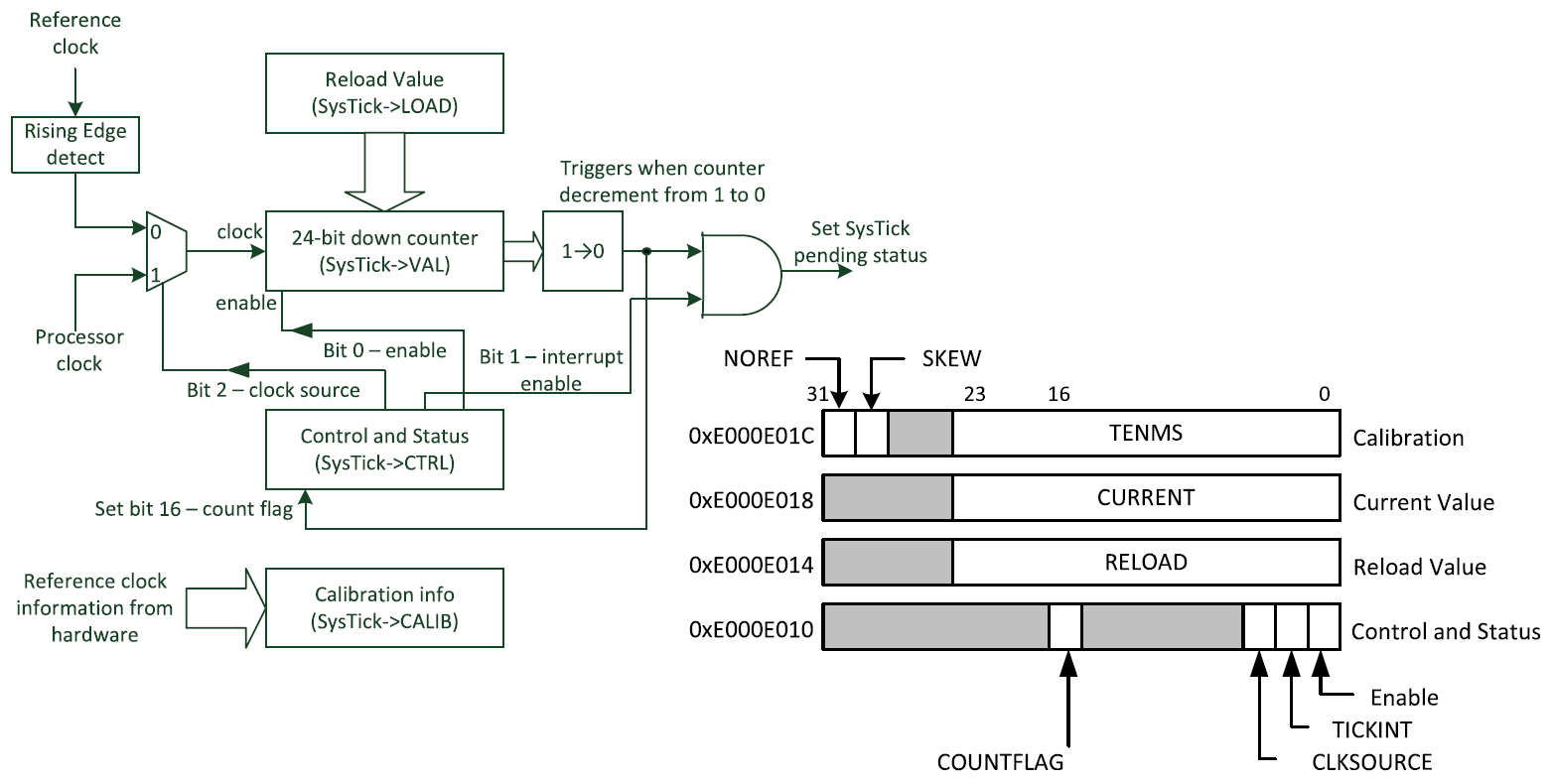
SysTick here is a 24-bit down counter. It has three main registers:
Basic flow to setup systick timer:
After this, the counter starts decrementing. When it counts from 1 to 0, hardware sets COUNTFLAG, reloads the counter from LOAD, and triggers the SysTick exception if TICKINT is enabled.
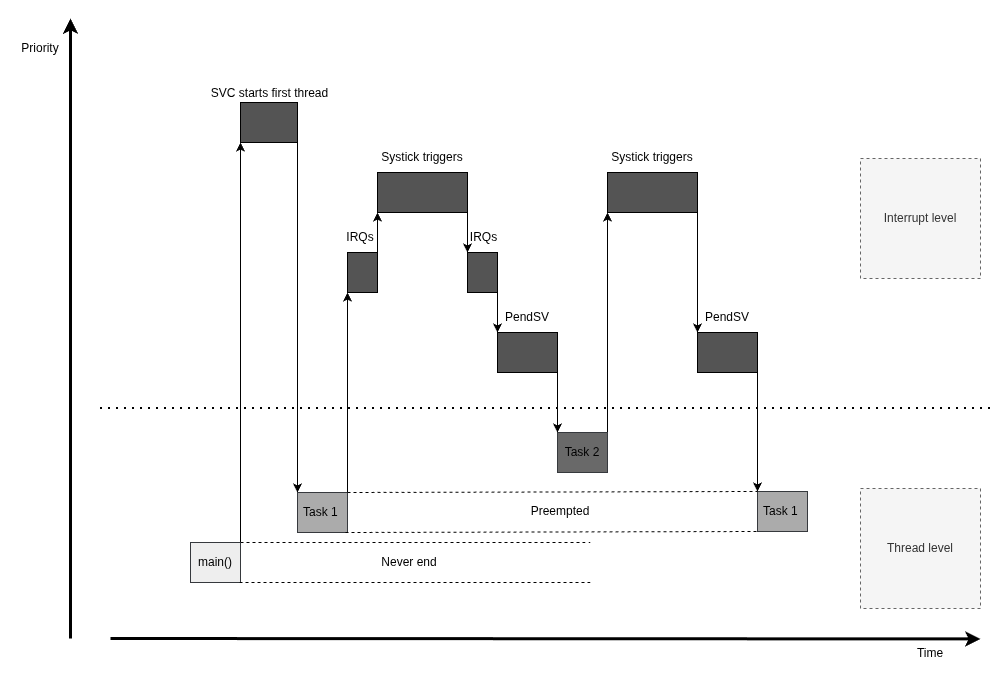
SVC (Supervisor Call) is the software exception AKOS uses for immediate kernel service requests. It is generated by the SVC instruction, and the CPU handles it right away instead of deferring it.
In AKOS, SVC 0 is used to start the first thread from main(). The SVC handler restores the first thread context and returns to Thread mode.
Because SVC is meant for immediate service entry, it is a good fit for startup and other privileged transitions where the kernel must respond right away.
PendSV (Pendable Service Call) works with SVC in the OS, but unlike SVC it can be pended. That makes it useful for actions that should wait until more important work has finished.
AKOS uses PendSV for context switching. The kernel pends it by setting the PENDSVSET bit in the NVIC Interrupt Control and State register. When PendSV runs, the handler saves the current thread context, restores the next one, and returns to Thread mode.
PendSV is typically triggered by events such as the system tick or a request that makes another thread ready to run. Keeping it at the lowest priority ensures that the switch happens only after higher-priority interrupts are done.
Cortex-M3 provides the DWT cycle counter (DWT->CYCCNT), which counts CPU clock cycles. AKOS can use it for lightweight benchmarking when you want to measure how long a code path takes or compare two implementations.
The usual flow is:
That gives a cycle-accurate measurement of the code region between the two reads. It is useful for profiling kernel paths such as context switching, interrupt handling, queue operations, or other timing-sensitive routines.
Example usage:
This measurement is based on CPU cycles, not wall-clock time. If you need time in microseconds or milliseconds, convert the cycle count using the core clock frequency. Formula to calculate:
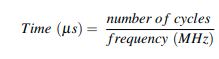
To measure AKOS timing performance, the following benchmarking metrics are used.
The benchmarking layout is based on the timing-metric approach used by Mazzi, Gaga, and Errahimi in their ARM Cortex-M4 RTOS comparison study.
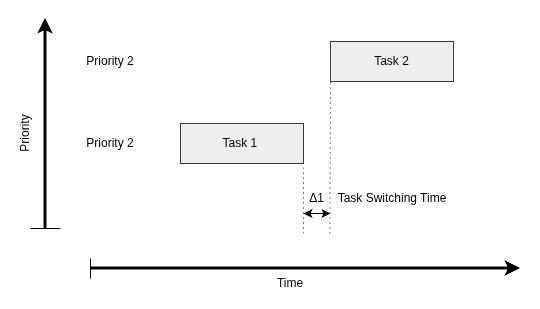
1. Task Switching Time(same priorities)
This is the average time it takes the kernel to switch from one task to another task with the same priority. The tasks must not be suspended or in sleep mode. This metric is used to evaluate how efficiently the kernel manages its data structures while saving and restoring context. Two tasks are created with the same priority and alternate the CPU between them in each iteration. The measured same-priority switch time is then used as a reference for other metrics that also involve task switching.
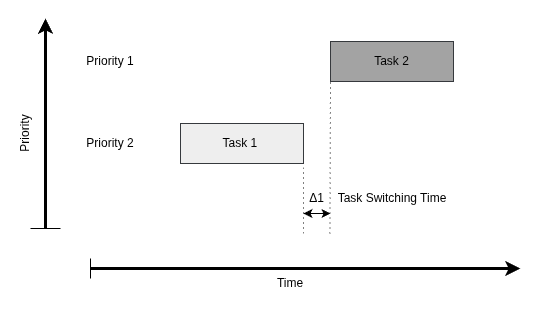
2. Task Switching Time(different priorities)
Preemption time is the average time it takes for a higher-priority task (HPT) to take over the CPU from a lower-priority task (LPT) that is currently running. This usually happens when the HPT is woken by an external event and moves from a blocked or suspended state to the ready state. In other words, it measures how quickly the kernel transfers control from a running LPT to an HPT that has become ready. To measure this time, two tasks with different priorities are created. First, the HPT is started and suspended. Then the LPT runs and later resumes the HPT. This process is repeated for a fixed number of iterations.
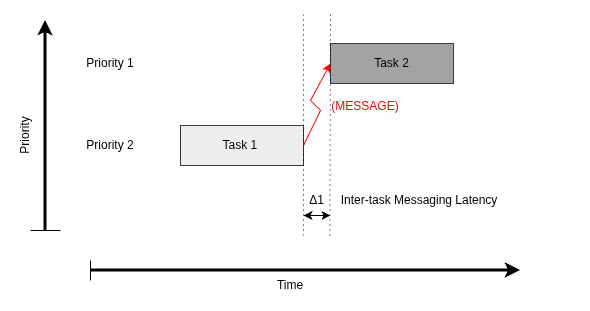
3. Inter-task Messaging Latency
Inter-task message latency is the time elapsed between sending and receiving a non-zero-length message from one task to another. The receiving task must be suspended while waiting for the message, and the sending task must stop executing after sending it so the latency can be measured correctly. The LPT remains blocked until it receives the message from the HPT and gets CPU time. It then blocks again when waiting for the next message. This process is repeated for the specified number of iterations.
Benchmark Summary
| No. | Test | Measurement Method | Average Cycles | Average Execution Time | Iterations | Comments |
|---|---|---|---|---|---|---|
| 1 | Context switch time, same priorities | DWT cycle counter | 440483 | 2.759 us | 5000 | Round-robin scheduling |
| 2 | Context switch time, different priorities | DWT cycle counter | 505000 | 3.156 us | 5000 | Preemptive scheduling |
| 3 | Message delivery latency | DWT cycle counter | 465465 | 2.909 us | 5000 | Task-to-task message queue |
 1.14.0